
Rhythm Quiz1.0 - App Store
You'll be able to see results in few seconds.
Publisher Description
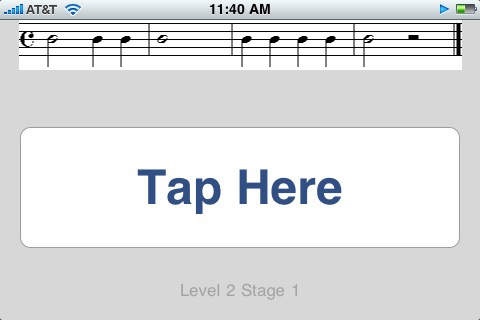
Rhythm Quiz is an educational music game designed to improve the rhythm reading skills of students. Developed by professional music educators, it can be used as a great tool by teachers to reinforce a musical curriculum.
Rhythm Quiz is unlike other "follow the beat" music games available today:
We have no audio playback of rhythms in order to eliminate mimicking or rote learning
We have no arrows or visual cues on when to play notes which discourage students from note reading
We track both the "attack" and the "release" of the note, teaching students how to sustain notes for their full values, perfect for most all major instruments and voice.
"...students could see their rhythmic reading improve almost instantly...I highly recommend this application to any music teacher wishing to improve individual student's rhythm reading skills."
-Alda Wilmoth, Band Director Harlem Middle School, Harlem, Georgia
"I have been using the app with my band students and have noticed a significant increase in their understanding of complex rhythmic patterns. The students have fun competing to get the highest score, while practicing rhythm at the same time."
-Michael D. Carattini, Band Director, Christa McAuliffe Middle School, Jackson, New Jersey
Requires iOS 3.0 or later. Compatible with iPhone, iPad, and iPod touch.
About Rhythm Quiz
The company that develops Rhythm Quiz is John Ferland. The latest version released by its developer is 1.0.
To install Rhythm Quiz on your iOS device, just click the green Continue To App button above to start the installation process. The app is listed on our website since 2010-10-29 and was downloaded 0 times. We have already checked if the download link is safe, however for your own protection we recommend that you scan the downloaded app with your antivirus. Your antivirus may detect the Rhythm Quiz as malware if the download link is broken.
How to install Rhythm Quiz on your iOS device:
- Click on the Continue To App button on our website. This will redirect you to the App Store.
- Once the Rhythm Quiz is shown in the iTunes listing of your iOS device, you can start its download and installation. Tap on the GET button to the right of the app to start downloading it.
- If you are not logged-in the iOS appstore app, you'll be prompted for your your Apple ID and/or password.
- After Rhythm Quiz is downloaded, you'll see an INSTALL button to the right. Tap on it to start the actual installation of the iOS app.
- Once installation is finished you can tap on the OPEN button to start it. Its icon will also be added to your device home screen.
Program Details
System requirements
Download information
Pricing
Version History
version 1.0
posted on 2010-10-29
Disclaimer
Official App Store Link
We do not host Rhythm Quiz on our servers. We did not scan it for viruses, adware, spyware or other type of malware. This app is hosted by Apple and passed their terms and conditions to be listed there. We recommend caution when installing it.
The App Store link for Rhythm Quiz is provided to you by apps112.com without any warranties, representations or guarantees of any kind, so access it at your own risk.
If you have questions regarding this particular app contact the publisher directly. For questions about the functionalities of apps112.com contact us.
